Drying filament: times, temperatures and when it matters
LayerWalker is a participant in the Amazon Services LLC Associates Program. We may earn a commission when you buy through links on our site, at no extra cost to you.
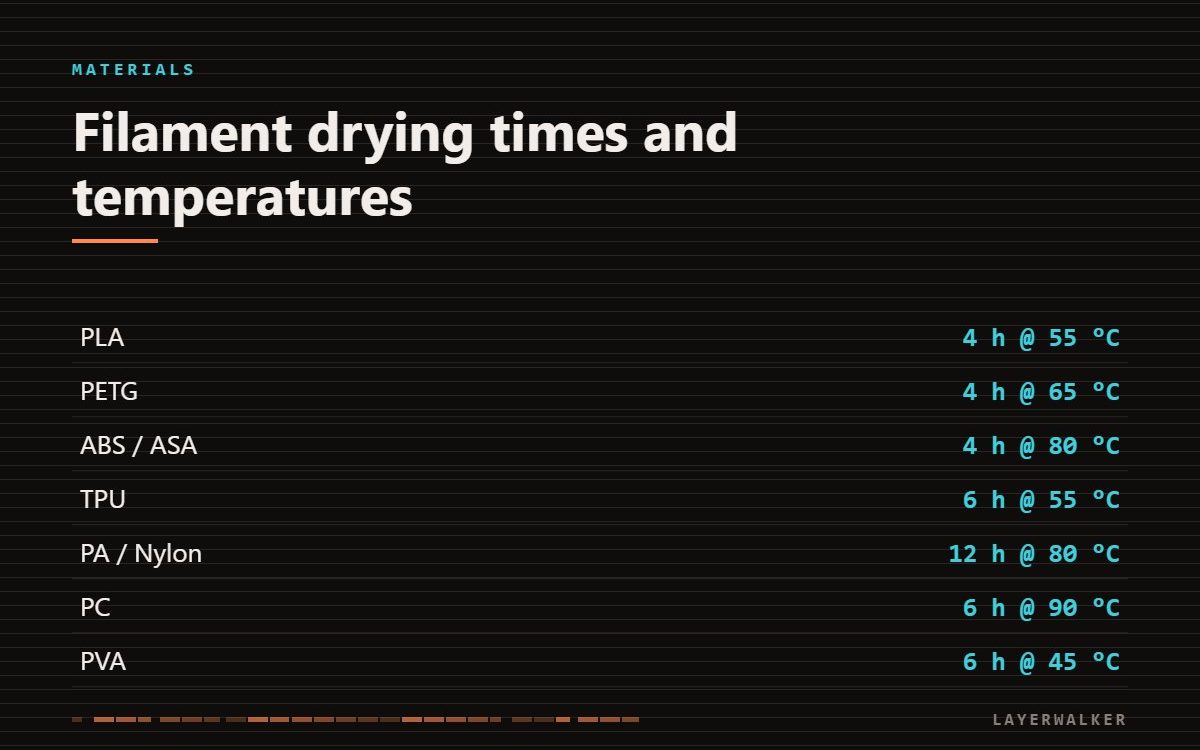
If the filament crackles or steams as it extrudes, it is wet. Nylon and TPU absorb enough moisture in a day to matter; PLA takes weeks. Dry at the temperature below for the full time — an hour does nothing.
| Property | Value |
|---|---|
| PLA | 4 h at 55 degC |
| PETG | 4 h at 65 degC |
| ABS / ASA | 4 h at 80 degC |
| TPU | 6 h at 55 degC |
| PA / Nylon | 12 h at 80 degC |
| PC | 6 h at 90 degC |
| PVA | 6 h at 45 degC |
Where to buy

SUNLU Filament Dryer Box 2026 New Upgrade S1 Plus, Black


Polymaker Polydryer Filament Storage Box for 1kg PA Nylon PLA PETG ASA ABS
Drying filament: how to tell before you print
Extrude 100 mm at temperature and watch and listen. Dry filament comes out as a smooth, even strand. Wet filament crackles, pops, steams visibly, and produces a strand with a rough or bubbled surface.
What wet filament does to a print
Stringing that no retraction setting fixes. Weak layer bonding, because steam at the interface prevents a proper weld. Rough surfaces from bubbles bursting. Under-extrusion, because steam takes up volume the plastic should occupy.
Crackling during extrusion, stringing that will not tune out, weak parts
Absorbed moisture flashing to steam in the melt zone
- Extrude 100 mm and listen. Crackling confirms it.
- Dry at the temperature and time in the table. Do not shortcut the time.
- Keep the spool in the dryer while printing for nylon, PC and TPU.
- Store dried filament in a sealed box with fresh desiccant.
- Regenerate silica gel in an oven at 120 degC rather than replacing it.
Do not exceed the temperatures above. PLA distorts above about 60 degC and can fuse into a solid block on the spool. Ovens with a fan run hotter than the dial says — check with a separate thermometer before drying anything in one.
Two materials where drying changes the result most visibly: PETG stringing and TPU stringing. On both, a wet spool defeats every setting you can change.
Storage is cheaper than drying
A sealed box with desiccant costs less than a dryer and prevents the problem instead of fixing it. Filament left open on a bench is absorbing moisture from the moment you unwrap it.

LayerWalker
Print defect diagnosis, calibration procedures and parts that actually fit. Corrections welcome through the contact page.