PLA Not Sticking to Bed: The Four Causes, in the Order to Check Them
LayerWalker is a participant in the Amazon Services LLC Associates Program. We may earn a commission when you buy through links on our site, at no extra cost to you.
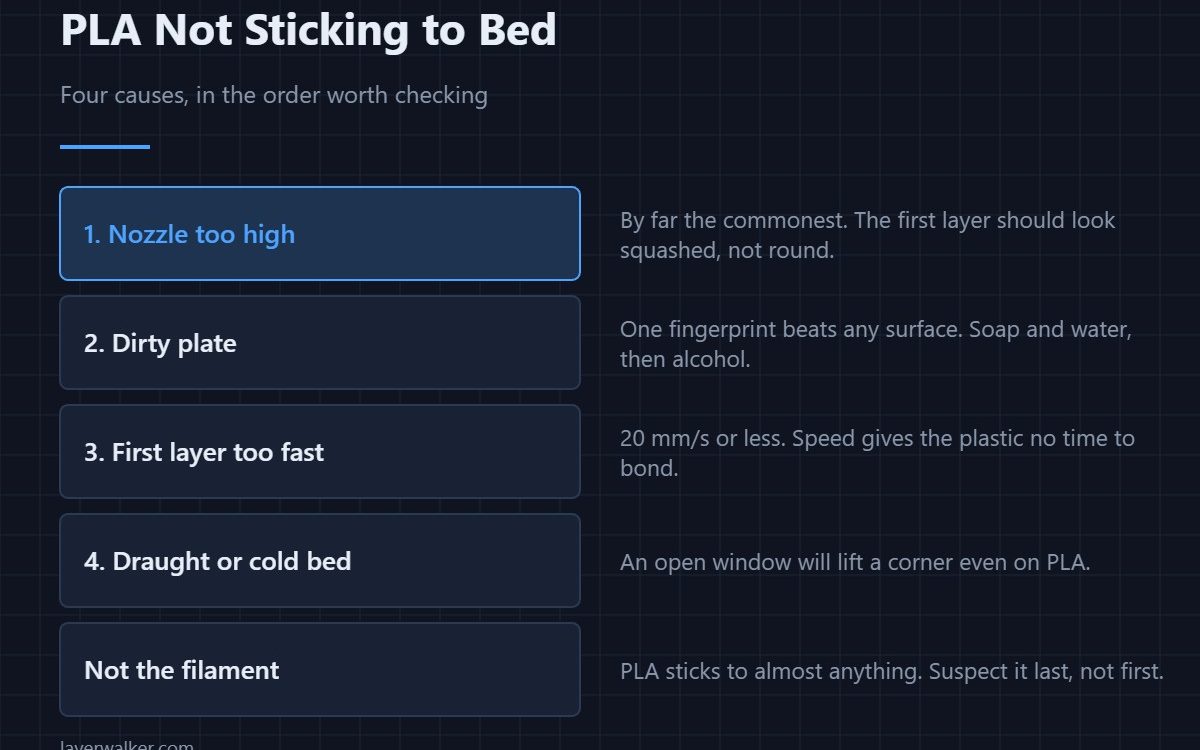
PLA not sticking to bed is almost never the filament’s fault. Check four things in this order: the nozzle is too high, the plate is dirty, the first layer is printing too fast, or there is a draught. PLA bonds to nearly any clean surface at 60 °C, so if it will not stick, one of those four is wrong.
PLA is the most forgiving filament sold. It barely shrinks, it does not need an enclosure, and it will stick to glass, PEI, tape and even bare aluminium if the basics are right. That is exactly why adhesion failures on PLA are worth taking seriously — they are pointing at a setup problem that will get worse with every other material.
Where to buy


1. The nozzle is too high
This is the cause about three-quarters of the time. A correct PLA first layer looks squashed: the lines are wider than they are tall, and neighbouring lines have merged with no gaps. If the lines are round, separated, and you can see the plate between them, the nozzle is high and nothing else you change will help. Set it with a live Z-offset adjustment while a first-layer square prints, not by eye.
2. The plate is dirty
PEI works by a mix of chemical and mechanical adhesion, and one fingerprint defeats both. Handle plates by the edges. Wash with warm water and washing-up liquid first, then wipe with isopropyl alcohol — alcohol on its own smears skin oil around instead of removing it. The full cleaning routine takes two minutes and fixes more adhesion complaints than any setting change.
3. The first layer is too fast
Set the first layer to 20 mm/s or slower. Plastic needs time in contact with a warm plate to bond, and at 50 mm/s it simply does not get it. This is the setting people forget when they import a fast profile from somewhere else.
4. Draughts, and a bed that is not as hot as it says
An open window on one side of the printer will lift a corner even on PLA. So will a bed that reports 60 °C at the thermistor but sits at 48 °C at the corners, which is common on cheap heaters. Check the corners with an infrared thermometer if adhesion is always worse in the same place. The full picture of what each material needs is in bed temperature by material.
What not to do first
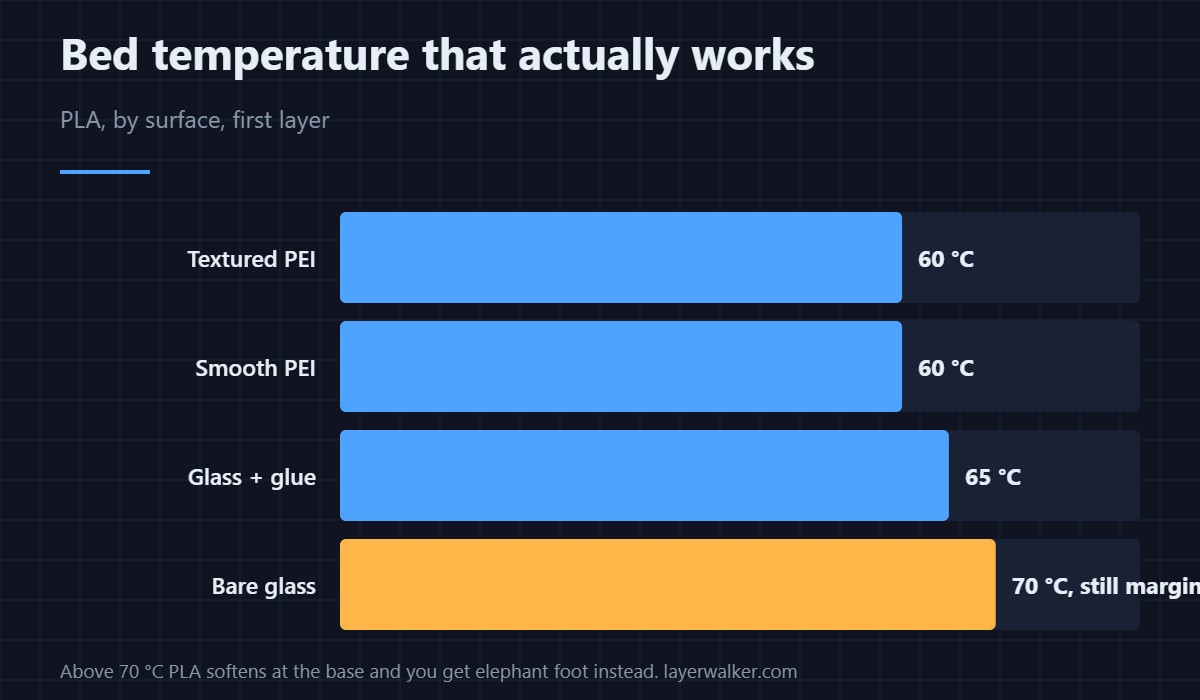
Do not start with glue. Glue stick on PEI is a release layer for PETG, not an adhesion aid for PLA, and reaching for it hides the real fault. Do not crank the bed past 70 °C either — PLA softens at the base and you trade a lifting corner for elephant foot. And do not buy a new plate until you have cleaned the one you have. If the problem persists across materials, it is the machine, and the general adhesion checklist covers the rest.
PLA Not Sticking to Bed FAQ
Why does PLA stick at the centre but not the corners?
That is a levelling or flatness problem, not an adhesion one. The bed is bowed or tilted, so the nozzle is further from the plate at the edges. Tram it by hand, and if the plate itself is crowned, a probe mesh will compensate for it.
Does PLA need a heated bed at all?
It prints without one on a good surface, but 60 °C makes it reliable. The heat keeps the base soft enough to bond for the first few layers, which is what stops corners curling on larger parts.
Should I use glue stick for PLA?
Only on bare glass, where it genuinely helps. On PEI it is unnecessary and it slowly contaminates the surface. If you need glue to make PLA stick to PEI, something else is wrong.
Can wet PLA cause adhesion problems?
Indirectly. Wet PLA extrudes unevenly and pops, and a line with a bubble in it does not bond properly. PLA absorbs water more slowly than PETG or nylon, but a spool left out for months is worth drying before you blame the bed.

LayerWalker
Print defect diagnosis, calibration procedures and parts that actually fit. Corrections welcome through the contact page.