HMS 0700-4500-0002-0002: filament cutter distance too large
LayerWalker is a participant in the Amazon Services LLC Associates Program. We may earn a commission when you buy through links on our site, at no extra cost to you.

HMS 0700-4500-0002-0002 means the filament cutter moved further than it should have to make its cut, and the firmware reads that as the XY motion having lost steps. The two facts are connected: the cutter works by driving the toolhead against a lever, so if cutting takes more force than expected, the motion system is what gives.
Difficulty easy
Time 20-40 min
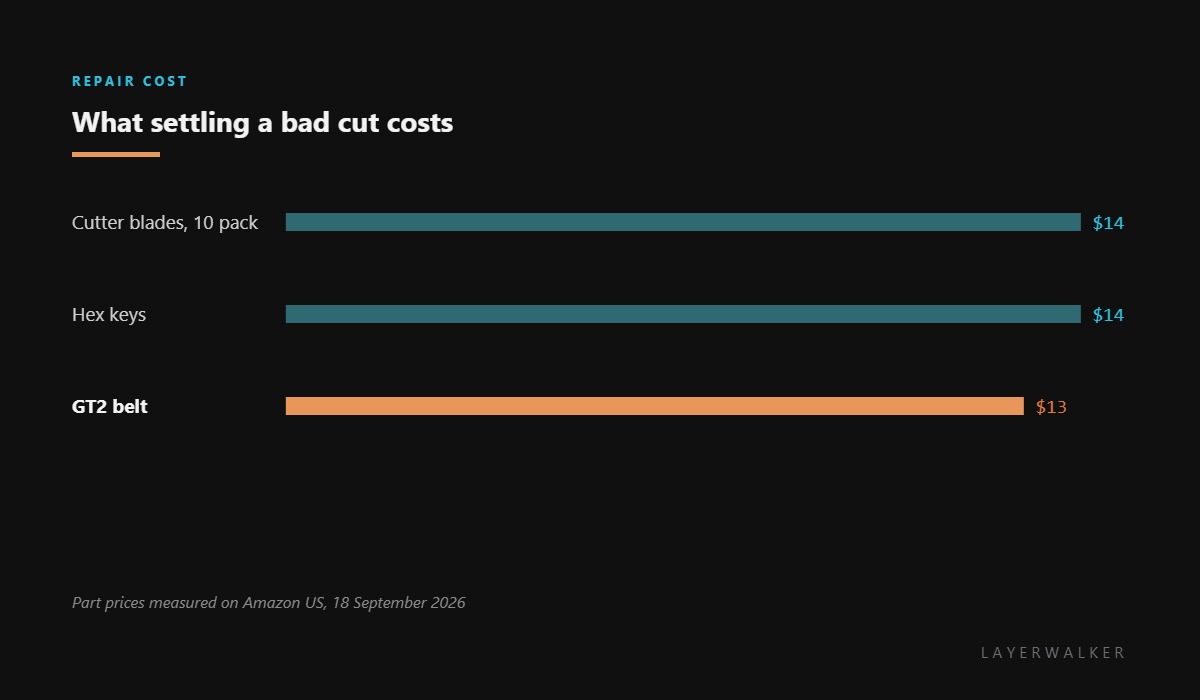
Parts under $20
Tools Hex keys, tweezers
Affected machines: H2S, P2S and the X1 series. On these printers the cut happens when the toolhead pushes a lever at the edge of its travel. There is no separate cutter motor, which is exactly why a cutting problem shows up as a motion error.
Where to buy


Why a blunt blade shows up as lost steps
A sharp blade parts the filament almost without resistance and the head stops where the firmware expects. A blunt one crushes before it cuts, so the head keeps pushing, the belt slips a tooth or two under the load, and the machine arrives further along than the maths said it should. The code is honest about the symptom and silent about the cause.
That is why the order of investigation is blade, then belt. A new blade often clears the fault entirely. If it does not, the belts were already marginal and the cutting load was simply the thing that exposed them.
Printer reports cutter distance too large, sometimes with a layer shift on the same print
Blunt or chipped cutter blade, slack belts, or debris in the cutter mechanism
- Power off and let the hotend cool before working near the toolhead.
- Inspect the blade edge under good light. A rolled or chipped edge is enough; it does not have to look dramatic.
- Clear filament fragments from the cutter mechanism and the lever path with tweezers.
- Fit a fresh blade, matching the pack to your printer family, and check it moves through its travel freely.
- Check belt tension on both axes. A belt that slips under cutting load is one that was already loose for printing.
- Run a load and unload cycle and listen. A good cut is a single clean click, not a crunch.
Blades are consumables on these machines and cost very little in packs. If yours has done a few hundred cuts, change it before diagnosing anything more complicated: it is faster than the investigation it saves.
The other cutter fault is the cutter handle not releasing. Our page on belt tension explains how to judge the belts this fault exposes, and the troubleshooting index covers the rest.
HMS 0700-4500-0002-0002 FAQ
Do I need to re-home after this code?
Yes. If the machine thinks it lost steps, re-home before continuing so the position is trustworthy.
How often should the blade be changed?
Treat it as a consumable. A few hundred cuts is a reasonable interval, sooner with abrasive filament.
Can abrasive filament dull it faster?
Considerably. Carbon-filled and glow-in-the-dark filaments blunt a cutter blade far faster than plain PLA.
Could the belts alone cause this?
They can, but a slack belt usually shows as ringing or a layer shift first. Check the blade before the belts.
A different slot fault blames the reader instead of the tag: HMS 0700-3000-0003-0003, where counting how many slots fail is the whole diagnosis.

LayerWalker
Print defect diagnosis, calibration procedures and parts that actually fit. Corrections welcome through the contact page.

