Bed Leveling Sensor: BLTouch vs CR Touch, and Which Board Each Needs
LayerWalker is a participant in the Amazon Services LLC Associates Program. We may earn a commission when you buy through links on our site, at no extra cost to you.
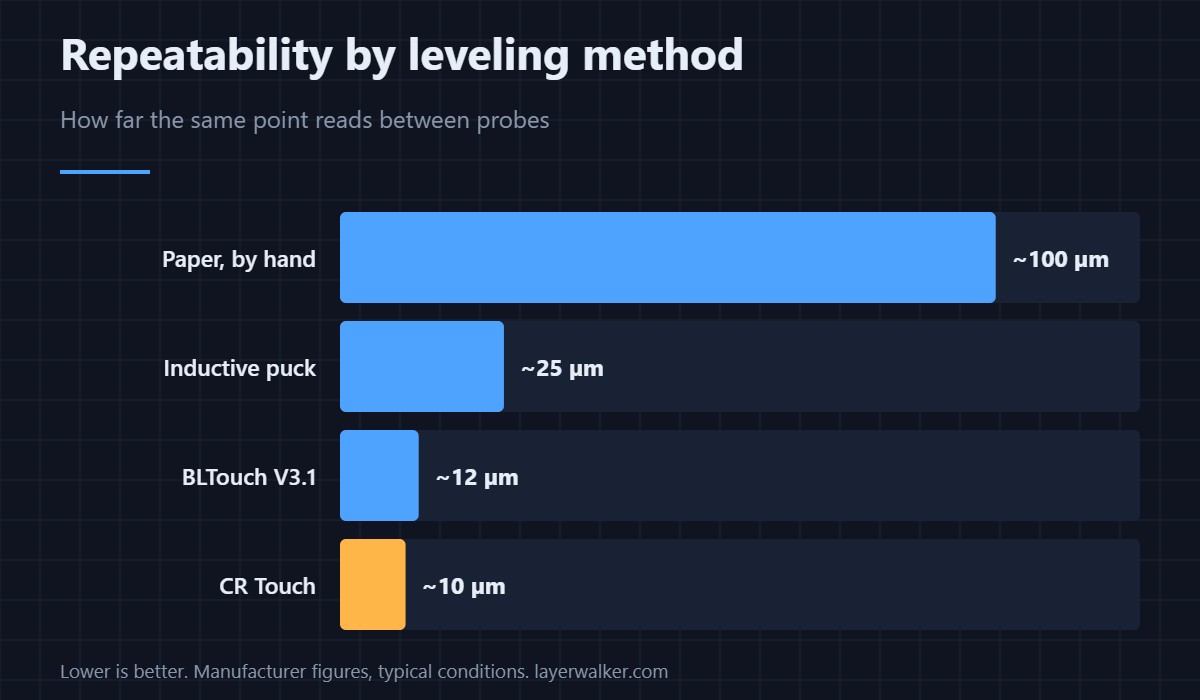
A bed leveling sensor measures a grid of points so the firmware can follow a bed that is not perfectly flat. The BLTouch and the CR Touch do the same job to within a couple of microns of each other; the CR Touch uses a metal pin instead of plastic and costs less, the BLTouch has the longer track record and better documentation. The deciding factor is almost never the probe — it is whether your board and bracket will take it.
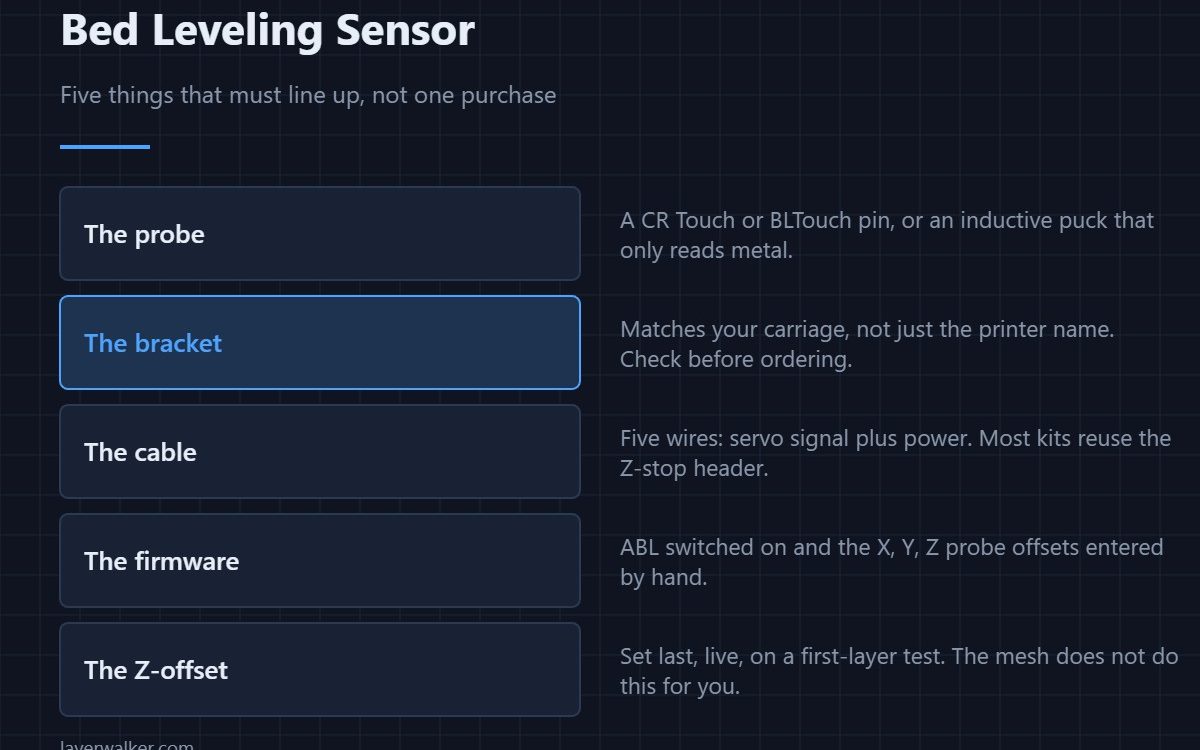
People buy the sensor and then discover the hard parts: the bracket does not match their carriage, the board has no dedicated probe header, or the firmware on it cannot be reflashed without a bootloader. Work backwards from those three and the choice of probe becomes easy.
Where to buy


BLTouch vs CR Touch, honestly
Both are contact probes. A pin drops, touches the bed, and a hall-effect sensor registers the deflection. The original Antclabs BLTouch V3.1 uses a plastic push pin; Creality’s CR Touch uses a metal one, which is the genuine improvement — plastic pins deform if you crash the head and then quietly report a false mesh forever after.
- CR Touch. Cheaper, metal pin, brackets for every Creality machine in the box. Documentation is thin and the wiring colours differ between batches.
- BLTouch V3.1. More expensive, plastic pin, excellent documentation, and every firmware guide on the internet assumes it. Buy genuine; the clones are the reason the BLTouch has a mixed reputation.
- Inductive probes. Cheap and have no moving parts, but they only see metal. Put a glass or thick PEI plate on top and the readings drift with bed temperature.
What your board has to support
Most kits wire into the Z endstop header, with the servo signal on a separate pin. A Creality 4.2.2 or 4.2.7 board has that pin broken out and is the easy case. The old 8-bit 1.1.4 board can be made to work but is short on flash memory once bed leveling is compiled in, which is where people give up. If you are already opening the case, a silent 32-bit board solves the memory problem and the noise at the same time — see what reflashing Marlin actually involves before you order.
If you run Klipper instead, none of the flash-size problems apply, because the configuration lives on the host. The trade-offs are covered in Klipper vs Marlin.
The bracket is the part that goes wrong
A probe has to sit at a fixed, known offset from the nozzle, and that offset goes into the firmware by hand. A bracket designed for an Ender 3 V2 carriage will not sit right on a direct-drive conversion, and a printed bracket that softens near the hotend will drift a few tenths over a long print. Check the carriage, not the printer name, and prefer metal if your head runs hot.
Best bed leveling sensor for most people
If you own a Creality machine and want this done in an evening, the CR Touch kit for your exact model is the right answer: correct bracket, correct cable, metal pin, lowest price. Choose the genuine BLTouch instead if you are converting something unusual and will be leaning on community guides, because every one of them is written for it. Either way, budget an hour for the setup steps people skip and tram the bed by hand first — a probe compensates a warp, it does not fix a tilt. Where this sits against everything else worth buying is in upgrading in the right order.
Bed Leveling Sensor FAQ
Is a bed leveling sensor worth it if I only print PLA?
Yes, but for convenience rather than quality. A flat bed and a careful hand-trim give the same first layer. What the probe buys you is not having to check, and not losing a ten-hour print because the bed shifted.
Can I fit a probe without reflashing the firmware?
Only if your board shipped with bed leveling already compiled in and simply disabled, which some later Creality boards did. Otherwise you need new firmware, because the probe offsets and the leveling routine have to exist in the build.
Does a probe replace levelling the bed by hand?
No. The compensation range is a few tenths of a millimetre. You still tram the four corners once, and after that you can genuinely forget about them.
Why is my first layer still wrong after fitting one?
Almost always the Z-offset. The mesh tells the printer the shape of the bed; the offset tells it how hard to squish. Set the offset live on a first-layer test after the mesh is stored, not before.

LayerWalker
Print defect diagnosis, calibration procedures and parts that actually fit. Corrections welcome through the contact page.