HMS 0300-C000-0001-0001: chamber temperature switching flap failed
LayerWalker is a participant in the Amazon Services LLC Associates Program. We may earn a commission when you buy through links on our site, at no extra cost to you.

HMS 0300-C000-0001-0001 means the chamber temperature switching flap did not complete its movement, and Bambu adds that it may be stuck. On these machines the chamber does not just heat: it also vents, and that flap is what decides which. It has a motor, a linkage and a position sensor, and any of the three can stop it.
Affected machines: H2 and X2D. This matters most to people who switch between materials, because the flap is how one machine prints both ABS, which wants heat kept in, and PLA, which wants it let out.
Where to buy


Move it by hand before anything else
Power the machine down and move the flap through its full travel with a finger. This single test splits the problem in two and costs nothing. If it binds, you have a mechanical fault and you can see where. If it swings freely and returns, the mechanism is fine and you are looking at the drive or the sensor instead.
When it binds, the cause is nearly always something in the path. Purge waste that has migrated to the back of the chamber, a fragment of a failed print, or a piece of packaging left behind after maintenance. Look with a torch rather than feeling around, because the flap housing is dark plastic and so is most of what gets stuck in it.
The other mechanical cause is a linkage that has come off its pin after a knock. That looks like a flap that moves part way and stops in the same place every time.
Printer reports the chamber temperature switching flap operation failed
Obstruction in the flap path, a detached linkage, or a loose actuator connector
- Power off at the wall and let the chamber cool before reaching inside.
- Look into the flap path with a torch, including behind the plate where purge waste collects.
- Move the flap by hand through its full travel and note whether it binds and where.
- Check the linkage between the actuator and the flap for a pin or clip that has come adrift.
- Reseat the actuator and position sensor connectors.
- Power up and watch the flap during the start-up self-test. It should move to both extremes without hesitation.
While it is stuck, prefer materials that suit whichever position it is stuck in. If it is closed, ABS and ASA will print normally and PLA will run hot; if it is open, the reverse. That is a workaround rather than a fix, but it keeps the machine earning while you sort it out.
The related airflow fault is adaptive airflow cannot enter cooling mode, and the filter version is filter switch flap malfunction. Our page on enclosed printers explains why the chamber needs to vent, and the troubleshooting index covers the rest.
HMS 0300-C000-0001-0001 FAQ
Can I still print?
Yes, with the material that suits the position it is stuck in. Treat that as temporary.
Is there a part to buy?
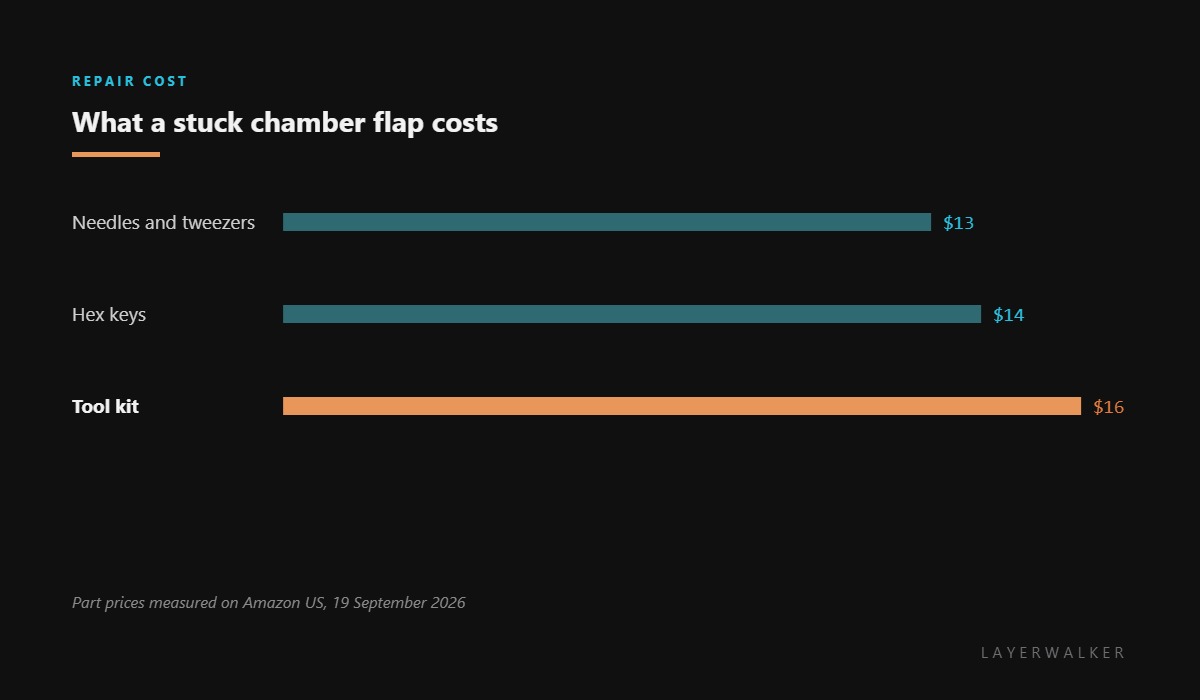
Not usually. It is a mechanism and a connector, which is why tools are the useful purchase here.
Why does it fail at the start of a print?
Because the printer sets the airflow mode for the material before it begins, and that is when it finds the flap will not move.
Can I just leave the chamber door open instead?
For PLA that helps briefly, but the machine will keep reporting the fault and its fan logic stays wrong.

LayerWalker
Print defect diagnosis, calibration procedures and parts that actually fit. Corrections welcome through the contact page.

