Ender 3 Hotend Upgrade: All-Metal, High-Flow, or Keep the Stock One
LayerWalker is a participant in the Amazon Services LLC Associates Program. We may earn a commission when you buy through links on our site, at no extra cost to you.
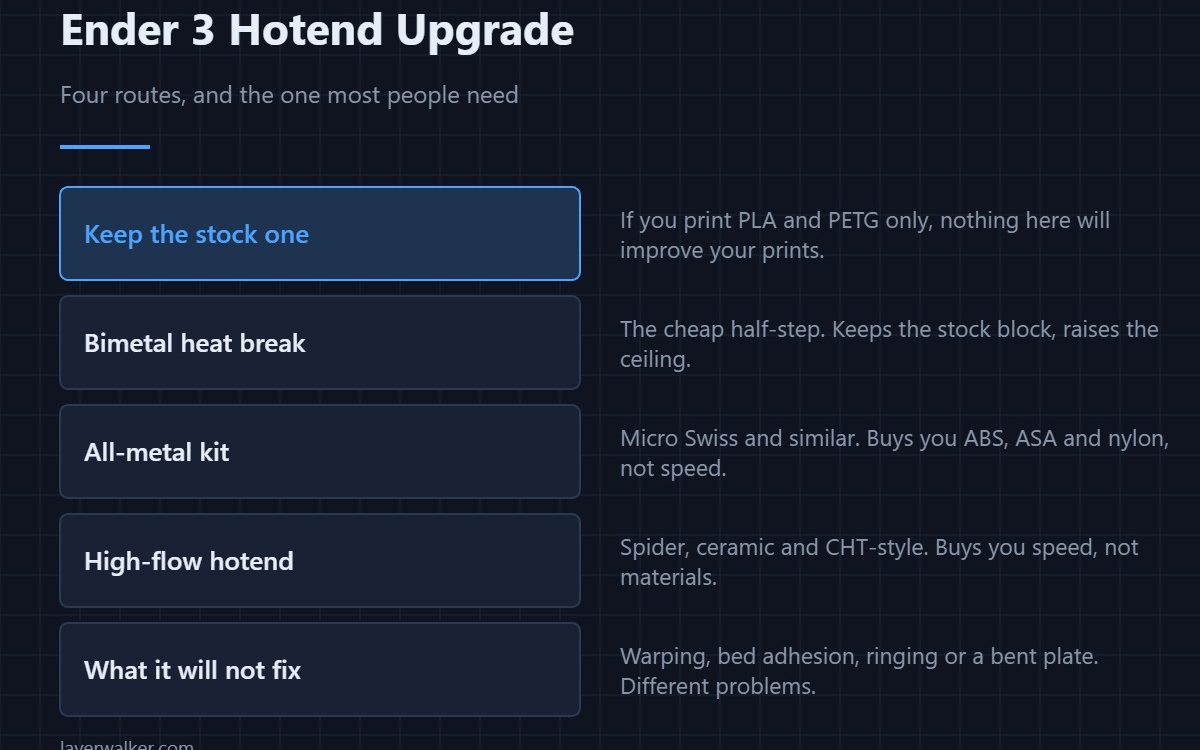
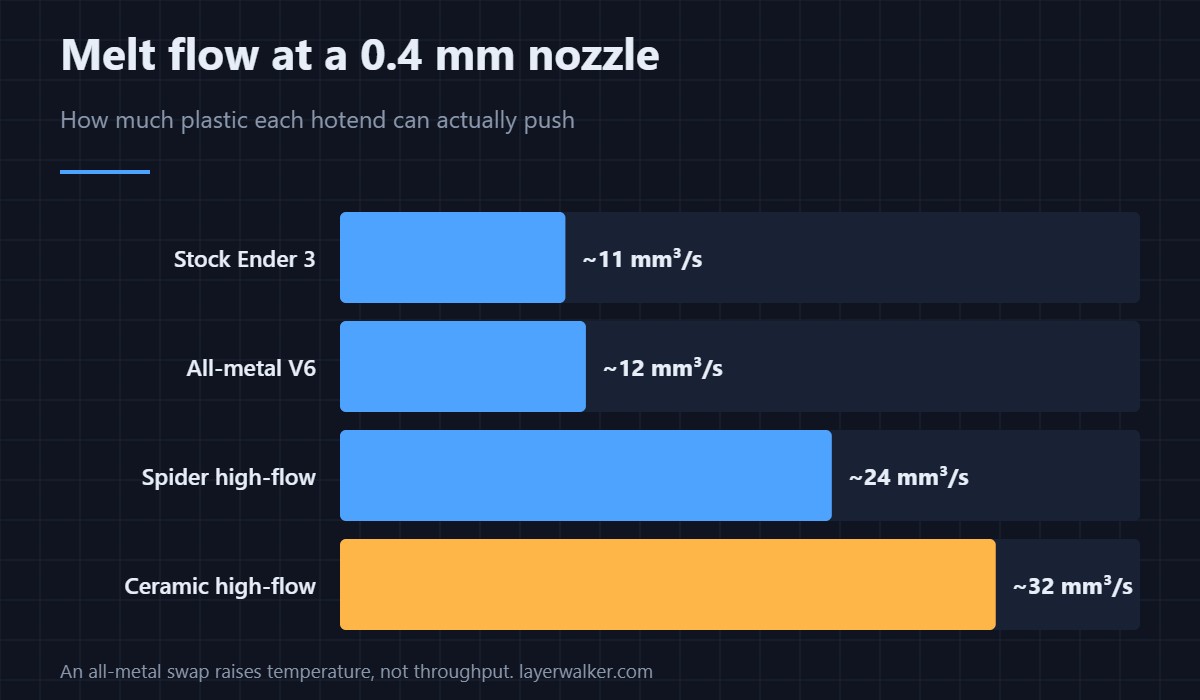
An Ender 3 hotend upgrade is worth doing for one of two reasons, and they need different parts. If you want ABS, ASA or nylon, buy all-metal — it raises the ceiling from 240 °C to about 300 °C. If you want speed, buy high-flow, which roughly doubles how much plastic the hotend can melt. If you print PLA and PETG at ordinary speeds, the stock hotend is genuinely fine and the money is better spent elsewhere.
The stock Ender 3 hotend gets an unfair reputation. It is a perfectly competent MK8-style assembly with a PTFE tube running to the nozzle, and it will print PLA and PETG for years. What it cannot do is go hot or go fast, and those are two separate purchases that people routinely confuse.
Where to buy


The four routes
- Keep it. No change in quality for PLA and PETG. Genuinely the right answer for most people.
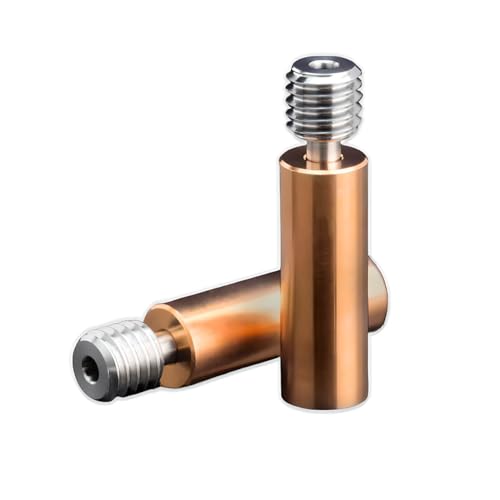
- Bimetal heat break. Ten pounds, keeps the stock block and nozzle, lifts the safe temperature. The cheapest honest half-step.
- All-metal kit. A Micro Swiss kit or similar. Buys materials, not speed.
- High-flow hotend. Spider, ceramic and CHT-style designs with a longer melt zone. Buys speed, and usually temperature as well.
What an Ender 3 hotend upgrade will not fix
This is where most of the money gets wasted. A new hotend does nothing for warping, nothing for bed adhesion, nothing for ringing, and nothing for a plate that is not flat. If your prints lift at the corners, the fix is temperature and draught control, not hardware. If the first layer is inconsistent, it is the bed. Check the cheap causes before you open the carriage.
It also will not fix a clogging problem on its own. A hotend that jams every few prints usually has a worn nozzle, a degraded PTFE tube, or a heatsink fan that has slowed down — and the last of those gets worse, not better, after an all-metal swap.
Choosing by what you actually print
PLA and PETG only: stock, or a bimetal break if you want insurance at PETG temperatures. ABS, ASA and nylon: all-metal, plus an enclosure, because the hotend is only half of what those materials need. Carbon fibre or any filled filament: the hotend barely matters, but the nozzle absolutely does and brass will be gone inside two spools. Chasing 300 mm/s on a bed-slinger: high-flow, and accept that the frame will limit you before the hotend does.
If you are working through the platform generally, the ordered list of what pays back first is in Ender 3 upgrades that are still worth it and the general principle in upgrading in the right order.
Fitting notes
Tighten the nozzle at printing temperature, never cold, because the seal is metal against metal inside the block and it moves as it heats. Re-measure the Z-offset afterwards; a new assembly is rarely the same height. Raise your temperatures by 5 to 10 °C on an all-metal build. And if the old PTFE tube looks brown at the end, that discolouration was already costing you prints.
Ender 3 Hotend Upgrade FAQ
Will an all-metal hotend make my Ender 3 print faster?
No. Flow rate stays around 11 to 12 mm³/s at 0.4 mm, essentially unchanged. Speed comes from a high-flow design with a longer melt zone, or from a larger nozzle.
Is the stock Ender 3 hotend really good enough?
For PLA and PETG at normal speeds, yes. Its limits are 240 °C and about 11 mm³/s. If neither of those numbers is in your way, an upgrade changes nothing you will be able to see.
Which Ender 3 hotend upgrade is best for ABS?
All-metal, and an enclosure. The hotend lets you reach the temperature; the enclosure is what stops the part cracking as it cools. One without the other is disappointing.
Do I need a new fan duct as well?
For a bolt-in all-metal kit, no. For a V6 or high-flow conversion, usually yes — and the heatsink fan matters more after the swap than before, because heat creep replaces liner failure as the thing that jams you.

LayerWalker
Print defect diagnosis, calibration procedures and parts that actually fit. Corrections welcome through the contact page.

