HMS 0300-1700-0002-0002: hotend cooling fan running slow
LayerWalker is a participant in the Amazon Services LLC Associates Program. We may earn a commission when you buy through links on our site, at no extra cost to you.

HMS 0300-1700-0002-0002 means the hotend cooling fan is turning, but slower than commanded. Bambu’s own wording says it may be stuck and need cleaning, and that is nearly always correct. Read this as the warning that comes before the stopped-fan code and the jam that follows it.
Affected machines: A2L and the X1 series. The difference between this code and the stopped-fan version is the measured speed: the tachometer still reports rotation, just not enough of it. That means the motor works and something is holding it back.
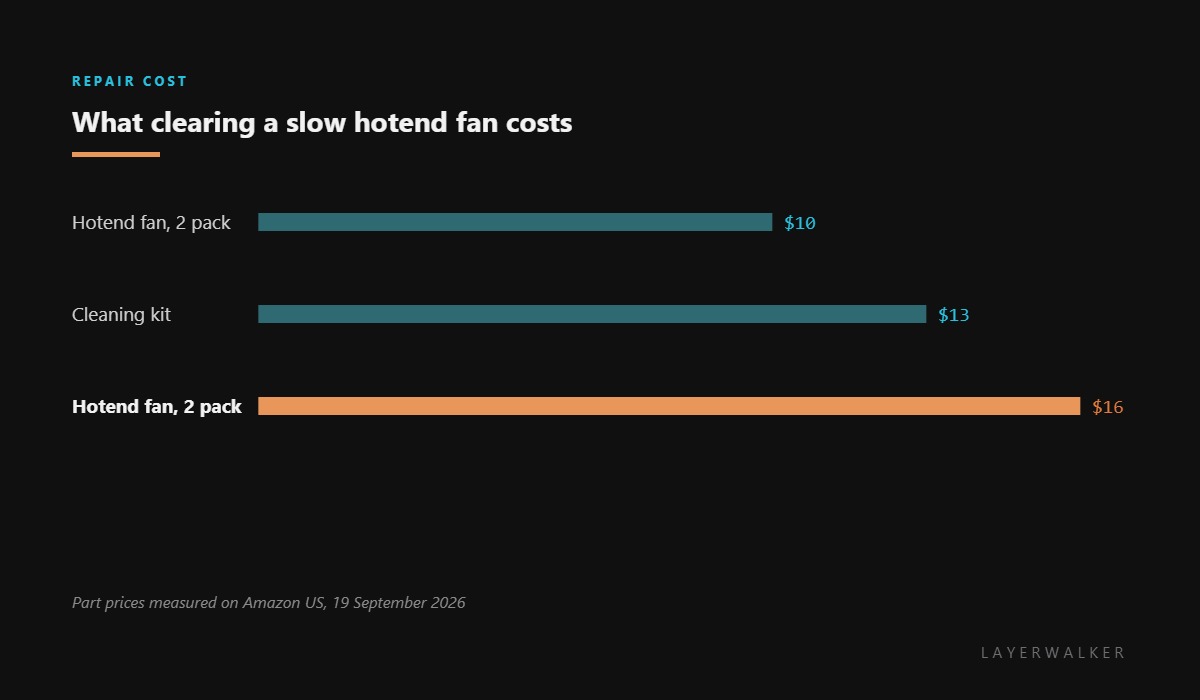
Where to buy


What slows a fan that still turns
Three things, in order. Dust packed into the hub, which is invisible from the front and obvious once you look from the side. A wisp of filament wrapped around the shaft, usually left over from a purge that missed the bin. And dried lubricant in the bearing, which is what happens to a fan that has lived at 200 degC for a year.
The first two clean off. The third does not, and a fan with bearing drag will keep reporting slow until it stops altogether. That is the point at which having the spare already on the shelf pays for itself.
Printer warns that the hotend cooling fan is running slowly, usually without stopping the print
Dust or filament debris in the fan hub, or a bearing that has dried out
- Power off at the wall and let the hotend cool completely.
- Look at the fan from the side as well as the front, where packed dust is visible along the hub.
- Remove debris with a soft brush and compressed air. Never spin a fan hard with air, which can damage the bearing.
- Pick filament wisps off the shaft with tweezers rather than pulling them, so the blades do not bend.
- Spin the fan by hand. It should turn freely and coast for a moment; one that stops instantly has bearing drag.
- Power on and watch the reported speed. If it is still slow with clean, free blades, the bearing has gone and the fan needs replacing.
Do not ignore this one because the print is still running. A fan at eighty percent is enough today and will not be enough on a long print in a warm room, and the failure mode is a jam rather than a stop.
The stopped version of this fault is hotend cooling fan too slow or stopped. Our page on cooling fans explains the two fans and their jobs, and the troubleshooting index covers the rest.
HMS 0300-1700-0002-0002 FAQ
Can I finish the print that is running?
Usually yes, but watch it. If extrusion starts to look inconsistent, stop before it jams.
Can I lubricate the fan bearing?
Not usefully. These are sealed sleeve bearings and oil attracts the dust that caused the problem.
How often should this fan be cleaned?
Every few hundred hours, or whenever you have the toolhead open for anything else.
Does compressed air damage the fan?
It can if you let the blades spin fast. Hold them still with a finger while you blow the dust out.

LayerWalker
Print defect diagnosis, calibration procedures and parts that actually fit. Corrections welcome through the contact page.

