HMS 0300-1200-0002-0001: toolhead front cover fell off
LayerWalker is a participant in the Amazon Services LLC Associates Program. We may earn a commission when you buy through links on our site, at no extra cost to you.
HMS 0300-1200-0002-0001 means the printer cannot detect the front cover of its toolhead. Either it has genuinely fallen off, or it is sitting slightly proud of its clips. The printer cares because the cover is part of the cooling duct, and a print running without it cools unevenly on one side.
Affected machines: P1 series, P2S and the X1 series. The cover clips to the front of the toolhead and is the piece most often knocked loose while clearing a blob or changing a nozzle, which is why this code so often follows maintenance rather than a print.

Where to buy


Why a cover is worth stopping for
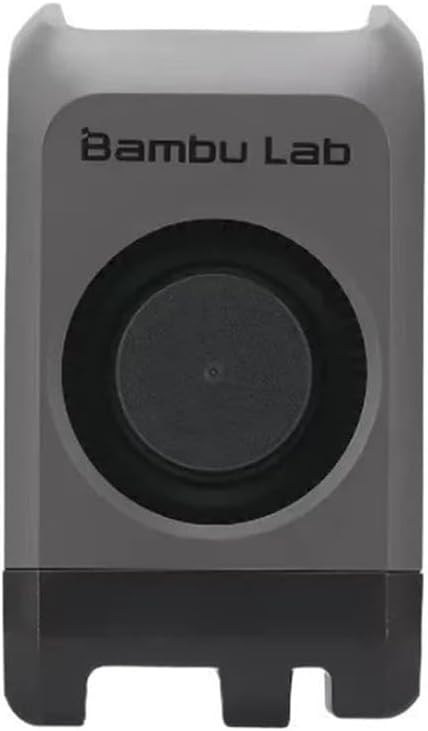
On these toolheads the front cover is not a lid over the mechanism. It forms one wall of the duct that turns the blower output into a stream aimed at the tip of the nozzle. Without it the air spreads, the part cools on one side more than the other, and overhangs on the open side droop while the rest of the print looks fine.
There is a safety element too. The cover keeps fingers away from a nozzle that reaches 300 degC, and on the enclosed machines it stops debris being drawn into the hotend fan. A printer that runs without it is not damaged, but it will produce worse parts and it is a hand injury waiting for a careless moment.
Printer reports the toolhead front cover has fallen off, or overhangs droop on one side only
Cover unclipped, mis-seated after maintenance, or a broken clip
- Power off and let the hotend cool completely before touching the toolhead.
- Look for the cover on the plate or in the bottom of the chamber. It usually falls straight down.
- Inspect the clips on both the cover and the toolhead body. A white stress mark on a clip means it has been over-flexed.
- Refit the cover square to the toolhead and press until both clips seat. It should sit flush, with no gap at the top edge.
- Power on and clear the code. If it returns with the cover visibly in place, the detection contact is dirty; clean it with isopropyl alcohol.
- If a clip is broken, fit a replacement cover for your model rather than taping it.
Match the part to the machine. The P2S cover is a full assembly with the duct moulded in, while the A1 family uses a simpler moulding. They are not interchangeable, and a cover from the wrong model will either not clip or will point the air in the wrong direction.
Our page on the hotend explains what sits behind that cover. The neighbouring toolhead sensor fault is the eddy current sensor signal jump, and the troubleshooting index covers the rest.
HMS 0300-1200-0002-0001 FAQ
Can I print without the front cover?
The printer will let you once the code is cleared, but cooling will be uneven and the nozzle is exposed. Refit it.
Why did it fall off after I changed the nozzle?
Because that job flexes the clips. Seat the cover deliberately afterwards rather than pushing it on one corner.
Does the wrong cover fit?
No. The P2S, the A1 family and the X1 series each use their own moulding.
The cover is on and the code persists. Now what?
Clean the detection contact with isopropyl alcohol. A film of grease from handling is enough to break it.

LayerWalker
Print defect diagnosis, calibration procedures and parts that actually fit. Corrections welcome through the contact page.

