HMS 0300-2500-0001-0005: Z axis motor rotation obstructed
LayerWalker is a participant in the Amazon Services LLC Associates Program. We may earn a commission when you buy through links on our site, at no extra cost to you.

HMS 0300-2500-0001-0005 means the Z axis motor met resistance it could not overcome, and the printer asks you to check for foreign objects. That wording is doing real work: the machine is telling you it suspects something in the way rather than a failed motor, and in practice it is usually right.
Difficulty moderate
Time 30-60 min
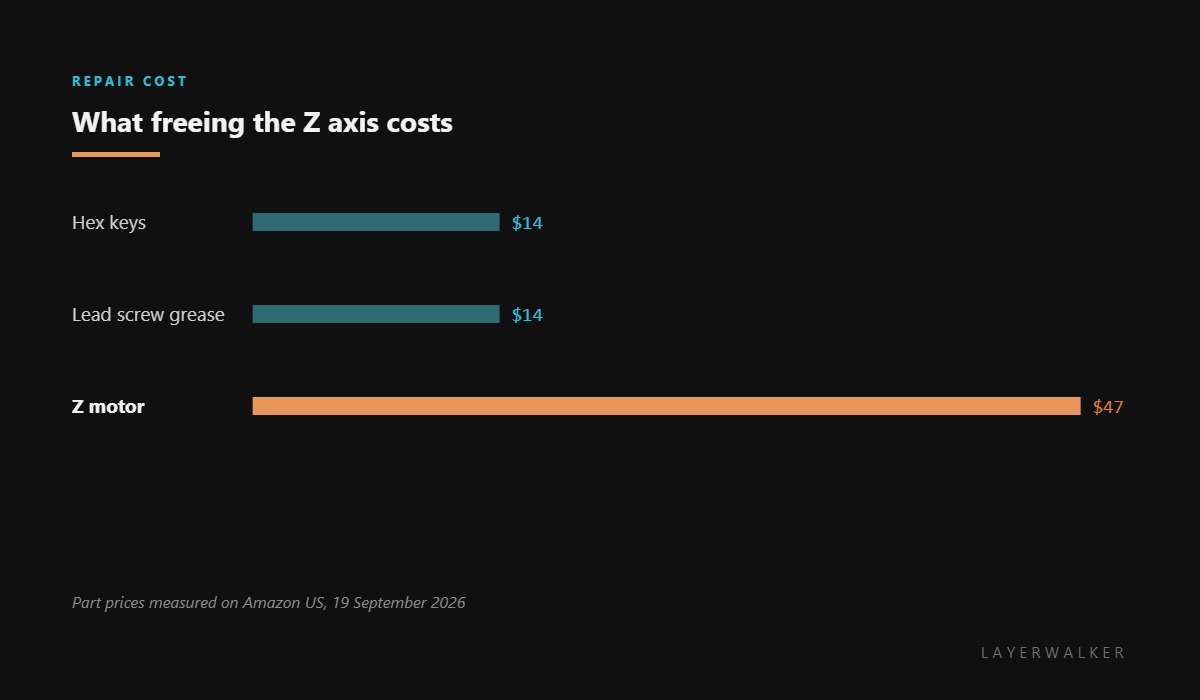
Parts under $50
Tools Hex keys, torch, grease
Affected machines: H2 series. The Z axis carries the bed on lead screws. Anything that falls into that path, and anything that stops the screws turning smoothly, produces a stall that the current sensing reports as an obstruction.
Where to buy


Turn it by hand before you buy anything
Power down and move the axis manually through its range. This single test tells you almost everything. A hard stop at one point means something is physically in the way, and you now know roughly where to look. Uniform stiffness through the whole range points at lubrication. Free movement everywhere means the mechanism is fine and the fault is electrical.
When there is a hard stop, use a torch. Prints that fell behind the bed, fragments of purge, packaging left after maintenance and dropped tools are the usual finds, and all of them are invisible by feel alone.
When it is uniformly stiff, clean and re-grease the screws with lead screw grease rather than oil. Oil runs off, collects dust and turns a dry screw into a gritty one.
Z axis stalls, the bed does not move as commanded, and the printer reports an obstruction
Debris in the Z path, dry or dirty lead screws, or a failing motor
- Power off at the wall and let the bed settle on its stops.
- Look into the Z path with a torch, including behind and beneath the bed, and remove anything you find.
- Move the axis by hand through its full range, noting whether it binds at one point or everywhere.
- If it binds at one point, look there again with better light before assuming anything else.
- If it is stiff throughout, clean the lead screws and apply a thin film of lead screw grease.
- If the axis moves freely by hand and the code persists, measure the Z motor and treat it as the next suspect.
Do not run the axis repeatedly to try to force past an obstruction. Driving a motor into a hard stop is how a cheap blockage turns into a bent screw or a damaged coupler.
The force sensor version of this symptom is continuous force, heatbed stuck, and the motor fault is abnormal Motor-Z resistance. Our page on the lead screw covers lubrication.
HMS 0300-2500-0001-0005 FAQ
Is my Z motor dead?
Usually not. Turn the axis by hand first; a bind you can feel is not a motor fault.
Which lubricant should I use?
Lead screw grease. Avoid oil and spray lubricants, which attract dust.
Can I force it past the tight spot?
No. Driving into an obstruction damages the screw or the coupler.
What usually falls into the Z path?
Failed prints, purge fragments, packaging and dropped tools, in roughly that order.
A sensor that reads badly and one that does not answer are different faults. HMS 0300-2500-0001-0003 means no data at all, and silence points at the communication link before the part.

LayerWalker
Print defect diagnosis, calibration procedures and parts that actually fit. Corrections welcome through the contact page.

