HMS 0300-0A00-0001-0002: heatbed force sensor sensitivity low
LayerWalker is a participant in the Amazon Services LLC Associates Program. We may earn a commission when you buy through links on our site, at no extra cost to you.

HMS 0300-0A00-0001-0002 means one of the heatbed force sensors is reading with low sensitivity. These sensors are how the machine levels: the nozzle touches the plate, the sensors weigh that touch, and the printer works out where the bed is. A sensor reading weakly makes that measurement unreliable, and an unreliable mesh is a bad first layer waiting to happen.
Affected machines: X1 series. The bed rests on three force sensors, and the machine compares them to build its picture of the surface. That design is what allows touchless levelling without a separate probe, and it is also why anything that changes how the bed sits affects the reading.
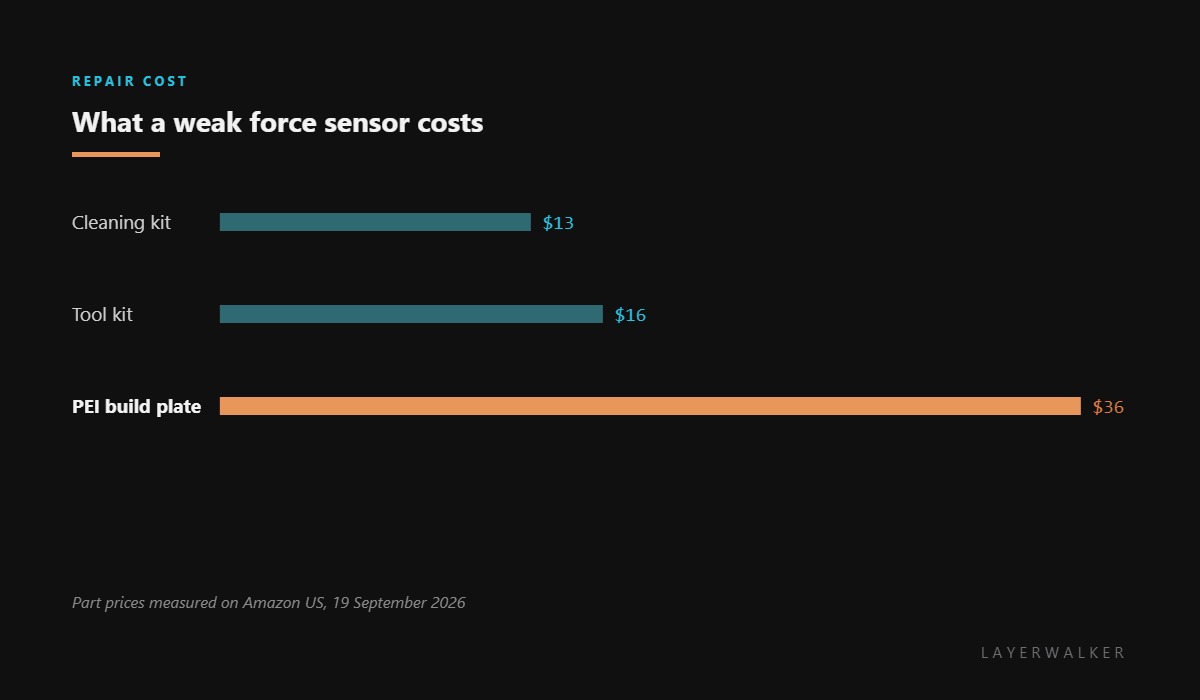
Where to buy


Anything that cushions the touch weakens the signal
Start with the plate. A sheet that is not fully seated on its magnets, or that has something trapped underneath, does not transmit the nozzle’s push cleanly to the sensors. The force arrives softened, and the sensor reports low.
Then the nozzle. A tip with a skirt of cooked filament makes a soft, spread contact instead of a sharp one, which is exactly what a weak reading looks like. Clean it warm, at about 150 degC.
Then the bed mounts. If anything is resting against the bed, or a cable has been routed so that it bears on the frame, part of the force is being carried by something other than the sensors.
Levelling fails or produces an implausible mesh, and the printer reports low force sensor sensitivity
Plate not seated, debris under the sheet, a dirty nozzle, or something bearing on the bed
- Power off and let the bed and hotend cool enough to handle safely.
- Lift the build plate and clean both its underside and the magnetic base beneath it.
- Wash the plate with dish soap and warm water, dry it, and refit it square against its locating features.
- Clean the nozzle tip at about 150 degC so the contact is sharp rather than spread.
- Check that no cable or object is resting against the bed or its mounts.
- Run levelling again and watch whether the same sensor still reports low.
If the same sensor reads low every time with a clean plate and nozzle, the sensor or its mount is the remaining cause. That is a service item on these machines rather than a part you fit.
The stuck-bed version of this fault is continuous force detected. Our pages on bed levelling and Bambu build plates cover the surfaces involved, and the troubleshooting index covers the rest.
HMS 0300-0A00-0001-0002 FAQ
Can I print with this code?
Levelling will be unreliable, so treat the first layer as a lottery until it is fixed.
Are the force sensors replaceable?
Not as retail parts. What you can act on is the plate, the nozzle and anything resting on the bed.
Why does a dirty nozzle matter?
Because it spreads the contact. The sensors are weighing a touch, and a soft touch reads low.
Does plate orientation matter?
Yes. Use the locating features every time, because a plate sitting proud in one corner changes what every sensor sees.

LayerWalker
Print defect diagnosis, calibration procedures and parts that actually fit. Corrections welcome through the contact page.

